
Yard notebook / PC full release — November 2026
Riding controls: keyboard, rebinding and auto-jump
PC players report WASD and Space for riding, with rebindable keys and single presses rather than holding keys down. For help with jump timing, open Settings → Accessibility and enable auto-jump. You still manage the horse’s speed and strength. Check the binding labels in your own settings before starting a ride.
Updated 2026-11-06 · PC full release — November 2026
The decision, step by step
Check bindings before the first ridden session
Open the game’s control settings and inspect or rebind the riding inputs to suit you. The November 4 Steam discussion confirms WASD and Space and says you press once rather than hold to keep moving. Management and horse care use different interactions from riding.
Enable auto-jump if precise timing is the blocker
In Settings, go to Accessibility and enable auto-jump. Return to an easy available riding activity to check the setup. A player in the same launch thread confirms this option; speed selection and strength management remain your responsibility.
Manage pace to preserve strength
Cantering, galloping and jumps drain strength. Slow below canter when you need to recover, then pick the gait appropriate to the next obstacle. The launch guide describes canter as a higher, shorter jump and gallop as a lower, wider one. Auto-jump does not make a tired horse ready for every obstacle.
Read pace-change warnings and horse behaviour
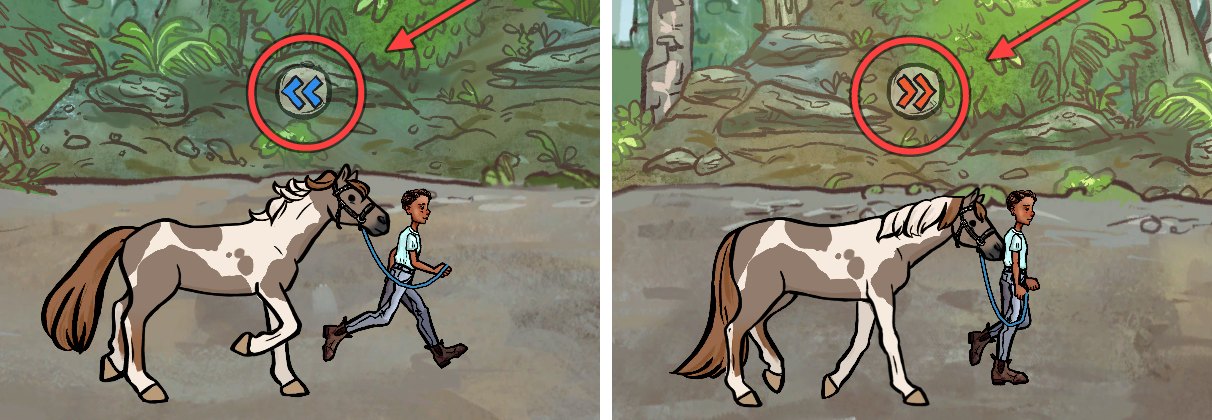
At lower Confidence, a horse may try to change gait itself. The warning arrows distinguish slowing from speeding up. Use the relevant correction in your binding setup before the change happens. Rebellious, Energetic and Chill can keep doing this even with high Confidence. Train trust separately if these interruptions dominate a ride.
 Open full-size image ↗
Blue left arrows warn of slowing; right arrows warn of speeding up. This image shows the warning icons during on-foot work, not a keyboard mapping for riding. Keep mode-specific controls separate
Confidence Training’s on-foot Praise and Back up prompts are not ridden controls. Likewise, a riding-lesson posture screen controls the rider’s hands, torso and legs. Read the current activity’s prompts instead of applying a key shown in another mode. If the layout is uncomfortable, revise the bindings and try the same easy activity again.
What success looks like
Your chosen bindings work with single presses, auto-jump is available if wanted, and you can change pace and preserve strength in an easy session before entering a demanding course.
If the result is different
If a key does something unexpected, check the active mode and saved bindings first. If jumps still fail with auto-jump, inspect strength, gait and Confidence. If the horse changes pace by itself, check the warning and traits rather than treating every change as a keyboard problem.
Sources & game version
For the PC full game. Screens and community observations can differ after updates; an exact client build is not shown in the published screenshots.